

Creating marketing content can be a disjointed process with a number of separate applications. Product images could be created in one, videos in another, and then edited separately. For every transition, there are more steps that will disrupt the flow of creativity. Moving product images, retyping instructions, and updating visual references also take valuable production time. The hassle of these repetitive tasks can be even more difficult if campaigns need to contain multiple creative versions. A connected workspace is a more structured way of doing these activities. Dreamina combines image generation, video creation, and photo editing. It has AI features to convert text prompts, reference images, and creative directions into marketing tools. This interlinked ecosystem enables creators to seamlessly transition between production steps.
Understand the Creative Bottlenecks Behind Disconnected Workflows
There are practical issues beyond application switching with disconnected production processes. These interruptions can impact asset organization, creative consistency, and production efficiency. Marketing Studio overcomes this fragmentation by consolidating related creative activities in one place. Knowing these bottlenecks provides an explanation for why a more connected workflow has value.
- Multiple Asset Uploads: Product images are often uploaded to a variety of image generators, video applications, and photo editing software. The same procedure is repeated again, increasing the preparation time.
- Disconnected Creative Instructions: When different applications need to be directed and specified, they can become disconnected. Crucial product information can get out of sync.
- Independent Generation Processes: The generation of images and video can be performed with separate interfaces, settings, and processes. Alternating between them will disrupt the creative development.
- Editing Interruptions: Transferring the generated assets to external editors means additional preparation and adjustments.
- Version Management: When assets are spread out across applications and folders, it's hard to keep track of multiple creative variations.
What Changes When Image, Video, and Editing Capabilities Meet in One Studio
Dreamina ties together multiple creative abilities around common product references and instructions. Uploaded product images can help direct the various promotional ideas without having to repeatedly describe the product's appearance. AI images can be used for product photography, eCommerce images, posters, and advertising graphics. AI video offers a specific space for making promotional video content. AI agents can generate images and short videos based on detailed creative instructions. The reference-based generation also helps to direct composition, storytelling, and visual direction. Creators can use reference videos to brainstorm ideas for advertising their own product. The Edit in canvas option offers more opportunities to enhance generated video content further. There are editing options such as cropping, background replacement, and effects. These capabilities minimize the need for unnecessary transitions between production stages. But creators should still check the results and make the necessary creative tweaks.
Skip the Back-and-Forth Between Tools with an AI Marketing Studio
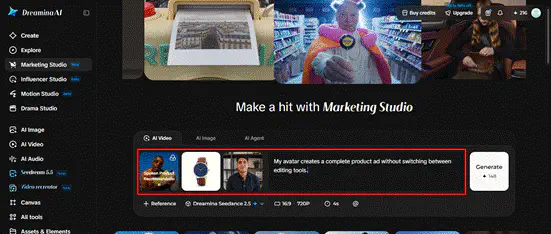
Step 1: Bring Your Product and Presenter into One Workspace
- Sign up or log in to Dreamina, so all your tools sit in one place.
- Later, head to Dreamina's "Marketing Studio" on the left bar, which replaces your tool hopping.
- Choose "AI video" for video creation or "AI image" for images, staying in one place. Pick "AI agent" to handle image and short video creation together in a single flow.
- Next, open "Change style" inside "AI video" to set the video's style without using outside apps.
- Click "Product" to upload the photo, then click "Avatar" to bring a presenter on board. You can also choose from the library of existing products and avatars, no searching elsewhere.
- Write a prompt for the look and feel, adding custom direction in the same box.
Step 2: Set Your Output Without Switching Tools
- Click the "Reference" tab to add a video guiding the AI, with no extra software.
- Next, choose a model, such as HappyHorse 1.1, Dreamina Seedance 2.5, or Dreamina Seedance 2.0. More options include Dreamina Seedance 2.0 Fast, Dreamina Seedance 2.0 Mini, Wan 3.0, and others.
- Pick your "Aspect ratio" and "Resolution" from their tabs, with custom settings for each channel.
- Click the "Duration" tab to select a custom video length, all within the same screen.
- Use the "@" option to mention or highlight the specific product within your video, right on the canvas.
- Finally, click the "Generate" tab to begin creation, and the video appears on this page.
Step 3: Preview, Edit, and Export in One Place
- Watch the finished video in full screen without sending it to another media player first. Check the product framing, the avatar's delivery, and the pacing before making any further changes.
- If you dislike the result, select "Edit prompt" or "Regenerate" to refine it quickly.
- Select the "Edit in canvas" option to edit the generated video without ever leaving Dreamina. This canvas gives you full freedom to replace the background, add effects, crop the video, and more.
- Once you are satisfied, click "Download" to save the video and finish the whole workflow. Then share it across your marketing channels, without using any other tool along the way.
Keep Product References and Creative Direction Connected
Reusable references help to keep the presentation of the product recognisable within various marketing materials. The product images uploaded can be used to direct future promotional photos, posters and ad videos. Recurring concepts for videos by the presenter and by the creator are also supported by selected avatar references. Rather than constantly redefining a product's look, creators can build variations based on similar visual references. Reference images and detailed prompts help to give more direction in the compositions generated. For instance, a product shot can set the tone for appearance and instructions for light, set, and camera movement. Templates can also be a great starting point for new campaigns. Reusable assets and creative guidance combine to provide organization for production across multiple projects.
Move from Initial Concept to Final Asset with Fewer Workflow Transitions
The creative process is a process that goes through a number of stages: exploration, development, refinement, and preparation. The decisions made during each stage are based on previous creative decisions and available references.
- Creative discovery: Analyze marketing templates, advertising examples, and visual references to find marketing campaign directions.
- Asset preparation: Product photo upload, avatar reference selection, clear creative instructions.
- Content generation: Create a promotional image or a video using the right content generation mode and generation settings.
- Visual refinement: Check the results produced and make changes to compositions, backgrounds, effects, or prompts as needed.
- Content adaptation: Get images and videos ready for various publishing locations. Localization tools can also be used to generate localized promotional material.
Organize Different Marketing Deliverables Around One Creative Workspace
Marketing campaigns don't only need one asset, but a number of related ones. Connected image, video, and editing capabilities enable Dreamina to support various deliverables. For ecommerce sellers, they can create product photos and product listing images based on product references. Independent brands can use consistent visual direction to produce promotional posters and campaign graphics. Video generation can be used for product advertisements, creator-like concepts, and presenter-led promotions. There are also advertising variations inspired by references, which allow for different storytelling approaches to be explored. The creators can also edit the dimensions and translate the text that is supported for various audiences-different materials for various publishing functions, recognizable product presentation. Having related deliverables grouped around common references allows campaign development to be managed more easily. It also saves time in creating content for multiple channels.
Conclusion
Disjointed creative processes can result in unnecessary transfers, redundant instructions, and extra editing. Dreamina is a fusion of image generation, video creation, and photo editing under one roof. Creative product consistency is achieved by using reusable product references and avatar assets. Different marketing needs are met with templates, reference-based generation, and flexible editing options. Creative review is still a must, but fewer transitions in the application can make production easier. This frees up time to experiment with ideas, test different versions, and further hone promotional materials. Marketing production is organized, flexible, and responsive to campaign needs with a connected creative process.