

Managing employees has always required a significant amount of administrative work. Businesses need to track attendance, calculate working hours, manage schedules, identify missing reports, prepare data for payroll, process employee requests and maintain important documents.
For many organizations, these tasks are still handled through several separate systems. Attendance information may be stored on a physical clock, schedules may be prepared in spreadsheets, employee requests may arrive through messages, and signed documents may be saved in different folders.
This fragmented approach can make workforce management unnecessarily complicated.
When employee information is spread across multiple systems, managers may struggle to understand what is happening in real time. Payroll teams may receive incomplete information, supervisors may need to chase employees for missing reports, and business owners may only discover mistakes at the end of the month.
Cloud-based workforce-management platforms are changing this process by bringing attendance, scheduling, reporting and employee documents into one organized environment.
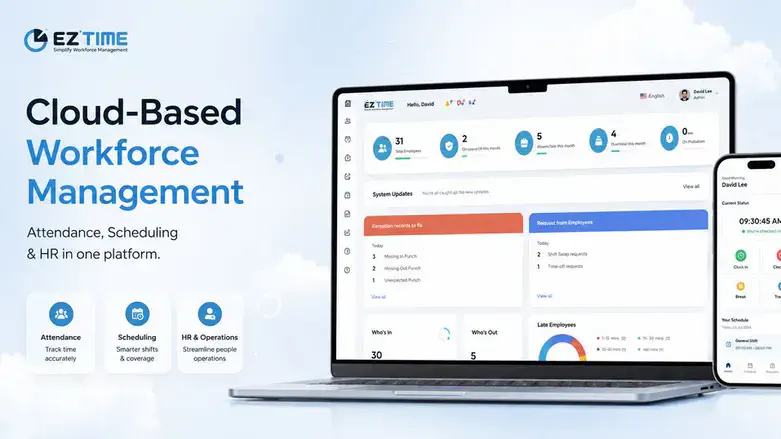
EZTime is a cloud-based platform designed to help businesses manage employee attendance, work schedules, calculations and digital documents from one central system.
The limitations of traditional attendance management
Traditional attendance clocks are still used by many businesses. Employees arrive at work, record their entry and later record their departure.
The problem is not necessarily the clock itself. The problem is often what happens to the information after the employee reports attendance.
In older systems, attendance data may remain stored locally on the device. At the end of the month, a manager or payroll employee must physically approach the clock, download the records using a USB drive and transfer the information to a computer.
Only then does the review process begin.
At this stage, businesses may discover missing clock-out reports, incorrect entries, duplicated records or days with incomplete information. Managers then need to contact employees, verify what happened and manually correct the records before payroll can be processed.
This creates several challenges:
• Attendance problems are discovered too late.
• Payroll preparation becomes stressful and time-consuming.
• Managers rely on employees’ memory to correct missing information.
• Manual corrections increase the risk of errors.
• Attendance information is not readily available throughout the month.
• Data may be stored in disconnected files or local devices.
A cloud-connected employee time clock offers a different approach.
Instead of keeping attendance records only on the physical clock, reports are transferred directly to the cloud-based management system. Managers can review attendance information during the month rather than waiting until payroll preparation begins.
This makes it possible to identify missing reports, unusual hours and incomplete records much earlier.
Real-time attendance visibility
One of the main benefits of a cloud-based attendance system is real-time visibility.
Managers can log in from a computer or management application and review attendance activity from almost anywhere. They do not need to stand next to the attendance clock or wait until the end of the month to access the information.
Depending on the permissions defined by the organization, managers can view:
• Which employees have arrived
• Which employees have finished their workday
• Entry and departure times
• Total hours recorded
• Employees who have not reported attendance
• Missing entry or exit reports
• Unusual attendance activity
• Attendance information by department or location
This immediate access gives managers a clearer understanding of what is happening across the business.
For organizations with several offices, stores, construction sites or customer locations, this can be especially valuable. Management can review attendance from different locations through one system instead of collecting separate reports from every site.
Multiple attendance-reporting options
Not every employee works in the same environment.
Some employees report to a central office every morning. Others work in stores, factories, warehouses, restaurants, construction sites or customer locations. Field employees may travel between several sites during the same day.
Because of these differences, businesses often need more than one method of attendance reporting.
EZTime supports several reporting options, allowing organizations to choose the method that fits each group of employees.
Physical attendance clocks
Employees can report entry and departure through a physical attendance clock using methods such as:
• Fingerprint identification
• A personal code
• A proximity card
The attendance clock can connect directly to the cloud system, allowing reports to appear in the management platform without requiring a monthly USB transfer.
Mobile attendance application
Employees can also report attendance through a mobile application.
This option can be useful for field employees, remote teams, service workers and employees who move between different locations.
The organization can define location-related settings and determine where employees are permitted to report attendance.
NFC attendance reporting
NFC tags can be installed at workplaces, branches, customer sites or designated reporting points.
To record attendance, an employee brings a compatible mobile phone close to the NFC tag. Because the employee must be physically near the tag, this can provide a practical attendance solution for businesses that do not want to install a full attendance clock at every location.
NFC reporting can be suitable for:
• Construction sites
• Cleaning teams
• Security personnel
• Restaurants and cafés
• Retail branches
• Customer service locations
• Temporary work sites
• Businesses with many small locations
Tablet and web-based reporting
Businesses may also use a tablet as a shared attendance station or allow employees to report through an authorized web interface.
The important point is that all reporting methods can feed information into the same system.
A business does not have to choose only one attendance method. Office employees may use a physical clock, while field workers use the mobile application and employees at smaller sites use NFC tags.
Management still receives one organized attendance picture.
Automated calculation of working hours
Recording entry and departure times is only the beginning of attendance management.
The system must also turn those reports into information that can be reviewed and used for payroll.
Working-hour calculations can become complex when employees have different schedules, employment agreements or overtime rules.
A company may employ full-time staff, part-time workers, hourly employees, shift workers and employees working under different conditions.
Manual calculation requires payroll teams to review each employee’s records and determine:
• Regular working hours
• Overtime
• Missing hours
• Breaks
• Standard hours
• Weekend work
• Holiday work
• Early arrivals or late departures
• Hours outside the approved schedule
• Rounding rules
EZTime allows businesses to define work agreements and calculation settings according to their internal requirements.
The platform can then calculate working hours automatically based on the rules assigned to each employee.
This reduces repetitive manual work and gives managers and payroll teams more organized information to review.
Automation does not eliminate the need for oversight. Managers can still review exceptions, make authorized corrections and approve employee reports. However, the system performs much of the basic calculation work that would otherwise need to be completed manually.
Identifying missing reports before payroll
A missing clock-out report may seem like a small issue, but when dozens or hundreds of employees are involved, the problem can become significant.
If missing attendance information is discovered only at the end of the month, managers may need to contact many employees at once.
The employees may not remember the exact time they left work several weeks earlier. Managers may need to estimate the hours or review other sources of information.
A cloud-based system allows organizations to identify missing reports throughout the month.
Managers can review attendance exceptions regularly and ask employees to submit corrections while the information is still fresh.
This creates a more controlled process and can reduce the number of last-minute corrections before payroll.
Employees may also be able to submit requests for attendance corrections, vacation days, sick leave or other absences through the system. Managers can then review and approve those requests in an organized manner.
Reports for managers and payroll teams
Different users require different types of reports.
A business owner may want an overview of working hours across the company. A department manager may need information only about employees under their responsibility. A payroll professional may need detailed attendance information for every employee.
EZTime enables businesses to produce reports according to:
• Individual employee
• Department
• Role
• Work location
• Date range
• Payroll period
• Attendance exceptions
• Missing reports
• Regular and overtime hours
Reports can be exported in formats such as Excel or PDF, making it easier to review, archive or transfer information to payroll professionals.
Businesses can also produce an individual monthly report for each employee, showing attendance records and calculated hours for the relevant period.
This can improve transparency and make it easier to review employee questions regarding attendance and payroll.
Shift scheduling and attendance in one system
For businesses that operate with shifts, attendance and scheduling are closely connected.
A schedule shows when an employee was expected to work. Attendance shows when the employee actually worked.
When these two processes are managed through different systems, comparing planned and actual hours can be difficult.
EZTime includes shift-scheduling capabilities that allow managers to prepare work schedules and manage employee assignments.
Managers can organize shifts according to employees, departments, locations or roles. They can then compare the schedule with actual attendance information.
This can help identify situations such as:
• An employee who arrived without being scheduled
• A scheduled employee who did not report attendance
• An employee who arrived late
• A shift that was not fully staffed
• A difference between planned hours and actual hours
• Employees working outside their assigned schedule
Managing scheduling and attendance in the same environment can provide a more complete view of workforce activity.
This is particularly relevant for restaurants, retail businesses, factories, hotels, service companies, healthcare organizations and businesses operating across several locations.
Digital employee documents
Employee management also involves a large amount of documentation.
Businesses may need to send employment forms, agreements, onboarding documents, declarations, approvals and internal policies.
When these documents are handled manually, the process may involve printing, scanning, emailing and repeatedly following up with employees.
Documents may remain unsigned or be stored in different folders, making them difficult to locate later.
EZTime enables organizations to send documents digitally, collect employee signatures and maintain organized employee records.
This can support a more efficient onboarding and employee-management process.
Instead of using one system for attendance, another system for scheduling and separate email conversations for documents, businesses can manage more of the employee lifecycle through one platform.
Managing employees across departments and locations
As businesses grow, workforce management becomes more complicated.
A small business may initially have one location and a limited number of employees. Over time, it may open new branches, add departments or employ field teams.
A cloud-based system allows the organization to manage these different groups within one environment.
Employees can be organized according to:
• Company or legal entity
• Department
• Branch
• Work location
• Position
• Manager
• Employment type
• Work agreement
Permissions can also be defined so that managers see only the employees and information relevant to them.
For example, a branch manager may manage attendance for employees in one location, while senior management receives a wider view across the organization.
This helps businesses maintain control without giving every user access to all company data.
Supporting better payroll preparation
Payroll preparation depends on accurate and complete attendance information.
When reports are missing, calculations are performed manually or changes are not documented properly, payroll teams must spend additional time checking the information.
A structured attendance system creates a clearer workflow:
1. Employees report attendance.
2. The system calculates hours according to defined rules.
3. Missing reports and exceptions are identified.
4. Employees submit correction or absence requests.
5. Managers review and approve changes.
6. Final reports are prepared for payroll.
This does not only save time. It can also create a clearer audit trail showing what was reported, what was changed and who approved the change.
Reducing dependence on spreadsheets and manual communication
Spreadsheets can be useful tools, but they are not always suitable for managing ongoing attendance processes.
When attendance is handled through spreadsheets, managers may need to collect information from several sources, manually update formulas and confirm that everyone is working with the latest version.
Employee requests may arrive through email, WhatsApp messages, phone calls or handwritten notes.
This makes it difficult to maintain one reliable source of information.
A centralized workforce-management platform reduces the need to move information manually between separate systems.
Employees report attendance through approved methods, managers review information in the system and payroll teams receive structured reports.
The result is a more consistent process with fewer disconnected files and conversations.
A solution for different types of businesses
Cloud-based attendance systems are not limited to one industry.
Different organizations can adapt the system according to their working environment.
Examples include:
• Offices and professional-service firms
• Restaurants and cafés
• Retail stores
• Manufacturing companies
• Logistics and transportation businesses
• Cleaning and maintenance companies
• Security companies
• Construction businesses
• Educational organizations
• Nonprofit organizations
• Municipalities and public-sector organizations
• Companies with field employees
• Businesses operating from multiple branches
Each business may use different attendance methods, calculation rules and reports, but the central objective remains the same: creating a reliable and organized workforce-management process.
Preparing for business growth
A workforce-management system should not only meet a company’s current needs. It should also be able to support future growth.
A business may begin with a small number of employees and one attendance clock. Later, it may add new locations, departments, supervisors and reporting methods.
Because EZTime is cloud-based, organizations can expand their use of the platform without rebuilding the entire attendance process.
New employees, locations and work agreements can be added as the organization grows.
Managers can continue accessing the system remotely, and attendance information remains centralized even when employees work from different locations.
A more modern approach to employee management
The purpose of workforce technology is not simply to replace paper or spreadsheets.
A well-structured system should give businesses better visibility, reduce repetitive administrative work and make information easier to manage.
With cloud-based attendance reporting, automated calculations, shift scheduling and digital documents, organizations can create a more connected employee-management process.
Managers can identify attendance problems earlier. Payroll teams can work with organized reports. Employees can use clear reporting and request processes. Business owners can receive a broader view of workforce activity.
Instead of waiting until the end of the month to discover missing information, organizations can manage attendance continuously.
Instead of transferring data through USB drives, information can move directly from the attendance clock to the cloud.
Instead of maintaining several disconnected tools, attendance, schedules and documents can be managed through one platform.
EZTime is designed to help businesses make this transition and manage the employee lifecycle from one central location.
To learn more about the platform and its workforce-management capabilities, visit www.eztime.com.