


AI detection has become part of the normal submission process for many students. A quick scan before turning in a paper can help catch phrasing that may raise questions, even in work that has been revised carefully. That makes testing these tools worth the time, especially when the goal is clarity rather than guesswork.
So I wanted to test a tool that promised a little more nuance. This review is based on my experience with aiscanner.io. I used several student writing pieces to see how the tool handled real academic scenarios.
Can the tool tell the difference between clean human work, obvious AI output, and mixed drafts where AI-generated text had been edited by a student?
What Is the AIScanner.io Detector Tool?
AIScanner.io is an AI detection tool built to scan text and estimate how much of it appears machine-generated. The experience is simple enough that you do not need a tutorial. You paste in your writing, hit scan, and get a score from 0 to 100 that reflects the likelihood of AI-generated content.
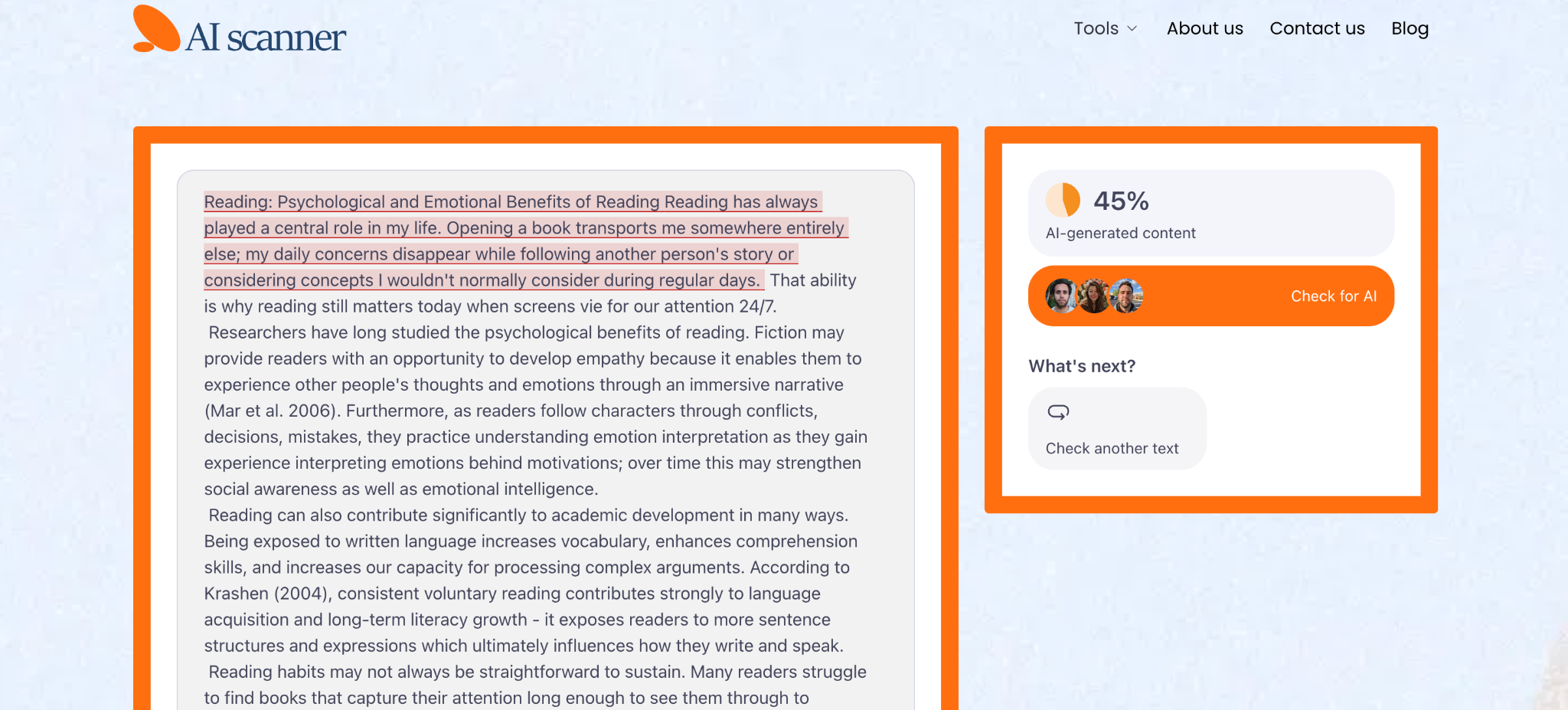
The report also highlights specific sentences or passages, which makes the result much easier to interpret than a single dramatic percentage with no explanation.
That sentence-level view matters. Students are rarely trying to diagnose an entire paper in the abstract. They want to know which lines feel risky, which parts sound too polished, and which edits may have pushed the writing into suspicious territory.
One practical detail makes the tool especially appealing for students: it is free to use, with no sign-up, no login wall, and no account required. When you are working against a deadline, the last thing you want is another platform asking for registration before it will even scan your text. AIScanner.io feels built for quick checks, which is exactly how many students would use it before submitting an assignment.
Putting the AI Scanner Detector to the Test
I tested the platform using four common academic scenarios. I wanted the results to reflect real student behavior rather than ideal lab conditions. That meant using writing from different levels and different methods of production.
First, I ran a high school essay written by a student with a natural, slightly uneven voice. A good AI text scanner should leave honest student writing alone, even when the phrasing is cleaner than average. Then I used a college-level paper fully generated by ChatGPT. That one should obviously trigger a strong result. After that, I tested the most realistic case: a university assignment that began with AI-generated paragraphs and was then revised manually with better transitions, clearer examples, and a more personal tone. Finally, I tried a humanized version of AI writing, which is the bypass test that many students quietly care about.
The scans came back quickly, and the highlighted output was easy to read even for someone who is not especially technical. Here is the quick summary:
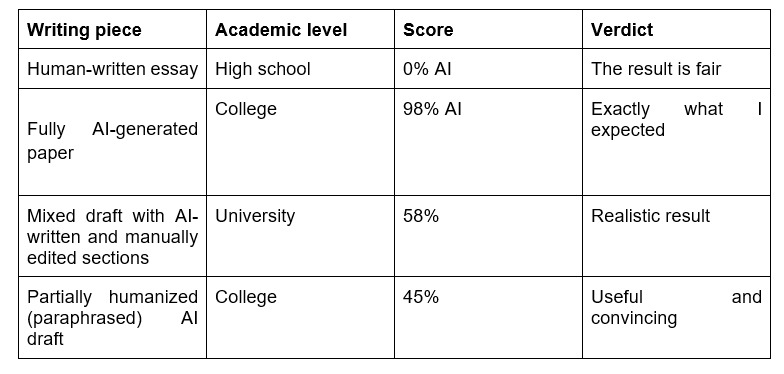
The strongest point here was balance. The tool did not seem eager to label everything suspicious, but it also did not become blind after a few edits.
Why Students Specifically Should Care About AI Detection
Students have more reason than ever to care about this. In many schools, professors or academic integrity systems run papers through detectors before reading them closely. That changes the emotional stakes of submission.
A draft can be thoughtful, original, and genuinely yours, yet still raise eyebrows if the language comes across as overly uniform. That is stressful, especially when the burden of explanation falls on the student.
The contexts vary. A high school student polishing a personal statement wants to avoid unnecessary suspicion before applying to college. An undergraduate may worry about strict course policies that treat any AI trace as a problem. A graduate student submitting seminar work or early research writing has even more at risk, because credibility matters in a different way at that level.
This is why it makes sense to check AI detector results yourself before submitting. It is much easier to revise a sentence at home than to defend your paper after it has already been flagged.
What AIScanner Gets Right (and Where It Falls Short)
The biggest thing AIScanner gets right is tone. It does not bury you in jargon or make the result feel like a courtroom verdict. It feels readable, quick, and built for ordinary use.
In my tests, the AI checker did well:
● No false positives in the student writing test I used
● Catches humanized content with decent sensitivity
● Fast turnaround that fits last-minute assignment checks
● Clean interface that does not overwhelm the user
● Free access with no obvious usage cap during testing
● No login, which lowers privacy anxiety for students
A few minor drawbacks are worth mentioning. The score still needs interpretation, especially for mixed drafts. A student who wants a simple yes-or-no answer may find the gray zone slightly frustrating. Also, like any detector, it cannot replace judgment. It helps you spot risk, though it cannot tell you how a teacher or school platform will interpret the same passage.
So, Should Students Use AIScanner Before Submitting?
Yes, I think they should. As a quick pre-submission check, AIScanner.io makes a lot of sense. It is free, easy to access, and fast enough to use even when you are finishing an assignment late in the evening and want one last look before uploading.
The bigger advantage is peace of mind. When you run your draft through an AI scanner text check before submission, you get a chance to catch suspicious phrasing early and revise it on your own terms. That feels much better than getting blindsided later by a flagged result you never saw coming.
There is one caveat, and it is the same caveat that applies to every detector in this category: treat the score as a signal, not a final ruling. Writing style, editing intensity, and sentence rhythm can all affect the result.
Still, as one tool in a student toolkit, AIScanner.io feels genuinely worth using.