


AI writing is everywhere in 2026. It shows up in student drafts, customer support macros, product pages, and the emails you send when your brain is done. Microsoft and LinkedIn reported that 75% of global knowledge workers used generative AI at work, and usage was rising fast.
That volume creates a new editing problem. A draft can be grammatically correct and still feel cold and oddly familiar. The fastest way to lose a reader is to sound like every other AI draft on the internet. Humaniser.ai positions itself as a fixer for that problem. The workflow is simple: paste text, click Humanize, review, and export. The point is to keep your ideas and sharpen the delivery so a real reader keeps going.
The Rise of "AI-Fatigue" in 2026
People are tired of AI-flavored writing.
You can see the fatigue in small moments: a professor reads three essays that share the same cadence; a manager receives five updates that all start with the same polite setup; a customer skims a blog post that feels smooth, yet empty. The result is "AI-fatigue," a growing resistance to copy that feels templated or too evenly polished.
The cost is measurable. A Zapier survey of enterprise AI users found that employees spend an average of 4.5 hours per week fixing low-quality AI outputs, and only 2% said they never revise AI-generated content.
Students feel this too, even outside any single classroom. The 2025 HEPI survey found 88% of students have used generative AI to help with assessments, and 18% said they included AI-generated (and edited) text in their work. When a lot of drafts get shaped by the same prompts and the same default tone, essays can start to blur together, even when the ideas are real. That is why you see more students trying to humanize AI essay drafts by adding sharper personal details, more specific examples, and a voice that sounds like a person with skin in the game.
What Is Humaniser.ai?
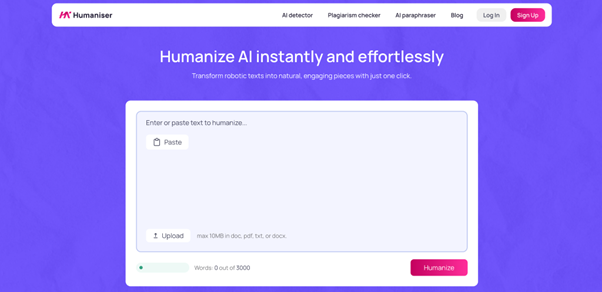
Humaniser.ai is a browser-based rewriting service designed to refine AI-generated drafts into more natural, human-sounding text. The tool has a three-step flow: paste or upload, click "Humanize," then get a new version in seconds.
Humaniser.ai also offers you other tools. Alongside the main feature, it has an AI detector, a plagiarism checker, and a paraphraser. That makes it easier to do a quick "draft -> refine -> scan -> fix" loop in one place, which is a common workflow when you want to humanize AI content and still move fast.
At a practical level, Humaniser.ai is a rewriter that targets the patterns people associate with machine text: repetitive sentence shapes, safe transitions, generic adjectives, and overly balanced paragraphs. The promise is that your meaning stays intact while the delivery feels more human.
Key features of the AI Humanizer Tool
Humaniser.ai sells simplicity. That is its biggest feature. Setup takes seconds. You paste the text, click a button, and get a rewrite. The speed matters because GenAI adoption has moved from experiment to routine.
Other benefits include:
- One-click rewriting focused on natural flow. It aims to turn stiff phrasing into smoother sentences and a more varied rhythm.
- Reader-friendly tone adjustments. The homepage claims it adds a "personal touch" and improves clarity and relatability.
- Bypassing AI scanners. The site says it replaces wording typical for AI to help content pass detectors.
- Keeping ideas and intent consistent. The messaging stresses that it retains your original thoughts while making them easier to read.
- Upload or paste input. The interface is built around fast copy-paste work, with an upload option in the step list.
Minor drawbacks to keep in mind:
- Meaning drift can happen in dense paragraphs. Any rewrite tool can soften precise language, especially with technical terms or strict academic phrasing.
- Voice can get "averaged out" if your original style is very specific. A humanizer tends to normalize tone unless you guide it with careful input.
Humaniser.ai itself advises reviewing the output before submitting.
Free Humanize AI Text: Limits and credits
On the public website, Humaniser.ai frames the tools as free to use and usable right away. It also states a 3,000-word limit per run, recommending that longer documents be processed in parts for accuracy.
So, in practical terms, the humanizing experience looks like this:
- Cost: $0
- Sign-up: optional for basic use.
- Input limit: 3,000 words per check or rewrite.
- Long files: split into chunks and run them separately.
Use cases: Where a free AI Humanizer helps most
A humanizer helps when you already have the ideas and structure, but the language feels off. Think of it as a polish pass for drafts that sound too neutral or too balanced.
Here are strong use cases where an AI humanizer helps, with the practical "why" behind each one:
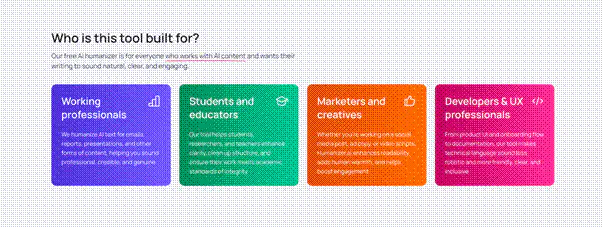
- Student drafts that need a more natural voice. If an essay reads like a template, a humanizer can vary rhythm, tighten phrasing, and reduce repeated sentence openers.
- Application and scholarship writing that needs personality. A rewrite can make the tone warmer and less mechanical, which matters when reviewers read hundreds of similar submissions.
- Emails that need to sound human under time pressure. When AI writes your email, the recipient often feels it. A humanizer can reduce the "corporate bot" vibe without changing the request.
- Blog content that needs reader energy. Many AI drafts over-explain and over-summarize. A humanizer can cut fluff and make paragraphs feel less symmetrical.
- Product and UX copy that needs clean, friendly language. The AI detector page calls out documentation and UI as common targets for scans and refinement.
- Non-native English polishing. The paraphraser page highlights grammar cleanup and smoother phrasing for fluency, which pairs well with a humanizer pass.
- "Workslop" cleanup after AI drafting. If your team uses AI heavily, you feel the cleanup tax. That 4.5 hours per week figure is the backdrop for why quick refinement tools exist.
A good rule: use a humanizer when you want the draft to feel less manufactured, and you still plan to own the final wording.
Raw AI vs. Humaniser.ai Refinement
Raw AI drafts tend to fail in predictable ways. They are correct, cautious, and consistent. Humans, even strong writers, are messier. They use uneven sentence lengths, concrete specificity, and occasional edge.
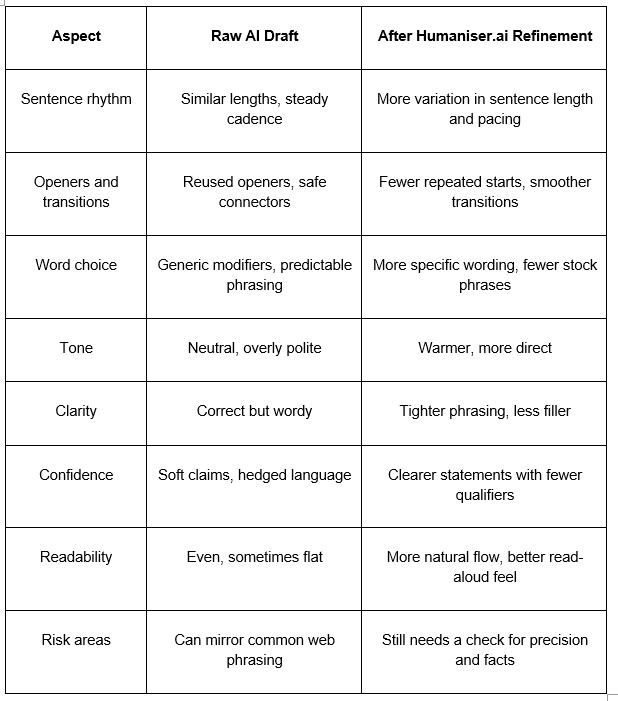
The table reflects a common pattern. Any rewrite can over-smooth a line you liked, which is why a quick final pass still matters.
How to humanize AI writing step by step
If you have ever used a paraphraser, this will feel familiar. The difference is the intent: you are aiming for human cadence, rather than simply different words. Use this flow for an AI humanizer essay workflow that stays controlled.
- Paste your draft into the humanizer. Start with the version that already has your ideas in the right order.
- Clean obvious issues before you click Humanize. Fix names, numbers, citations, and anything that must stay exact. Rewriters can rephrase a statistic in a way that shifts meaning.
- Click "Humanize" and generate a new version. It's a one-click action with results in seconds.
- Read it out loud, fast. This is a quick quality test. If a sentence feels too smooth or too performative, rewrite that sentence manually.
- Run a quick plagiarism and AI scan. If you are submitting for school or publishing professionally, use the site's AI detector and plagiarism checker as a second lens. Both tools are positioned as quick checks.
- Lock your voice with a final micro-edit. Add a detail that only you would include: a concrete example, a specific noun, a short line that feels natural in your tone. This step often helps more than any score.
A practical tip: save full-document rewrites for drafts that already feel coherent. For long essays near 3,000 words, test the introduction and one body section first, then continue.
Free Humanize AI: The Full Tool Set Beyond the Humanizer
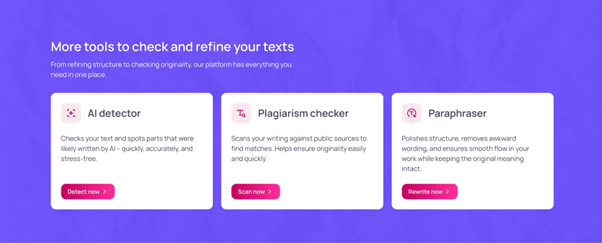
Humaniser.ai is more useful when you treat it as a small workflow. The site highlights three companion tools: an AI detector, a plagiarism checker, and a paraphraser.
AI Detector
Humaniser.ai's AI Detector is built for a quick reality check on whether a passage reads like machine-written text. You paste a draft and get a probability style result that helps you spot sections that feel overly uniform in rhythm, wording, or sentence structure. It fits workflows where speed matters, like blog publishing, client copy review, internal updates, and last pass edits before you send something out. Editors can also use it to screen batches for repeated phrasing across many contributors. Treat results as a signal, then confirm by reading the highlighted lines yourself. It works best on longer samples.
Plagiarism Checker
The Plagiarism Checker focuses on originality by scanning your text against public sources and surfacing overlaps you can inspect. It is useful when you summarize research, rewrite older posts, or combine notes from multiple references, since accidental similarity is common. A practical workflow is to run it after paraphrasing or major edits, then rewrite any matched lines and add citations where needed. For teams, it helps keep client deliverables clean and reduces the risk of duplicated phrasing across campaigns. It is also handy for checking guest posts before they go live. Use it before publishing, especially for SEO sensitive pages.
Paraphraser
Paraphraser is a rewriting helper for clarity and variation. You drop in a sentence or a full paragraph, and it rephrases the text while aiming to keep meaning intact. It is handy for smoothing awkward lines, reducing repetition, tightening long sentences, and generating alternate versions for intros, headings, or short updates. Writers use it when the idea is solid, but the wording feels stiff, too formal, or too close to a source they just read. After paraphrasing, skim for tone drift and check key terms, names, and numbers for accuracy. Then run a detector or plagiarism scan for reassurance.
How these tools fit together in a realistic loop:
- Draft with AI or write your own rough version.
- Humanize to fix rhythm and tone.
- Check with the detector for AI-shaped sections.
- Run a plagiarism scan if you used sources or rewrote a lot of web-like phrasing.
- Use the paraphraser on the paragraph that still feels clunky.
This workflow matters because AI adoption has become normal, yet confidence in AI output has not kept pace. Most teams now expect a human pass that adds specificity, checks claims, and smooths the voice. A simple loop also saves time, since you fix issues in one place instead of bouncing across tabs and tools. The goal is a draft that reads clean, keeps your meaning, and feels like it came from a real person.
Final Verdict
Humaniser.ai is built for the moment we are in: lots of AI drafting and rising reader skepticism, plus a growing cleanup tax. If you regularly produce AI-assisted drafts, a humanizer can save time by fixing the "same-sounding" problem before you do manual edits.
If you publish weekly, handle drafts, or manage student content, the time saved comes from fewer rewrites and less second-guessing.
The biggest upside is accessibility. The public toolset is free, it works in a browser, and it enforces a clear 3,000-word limit that encourages chunked editing. The main limitation is simple: it rewrites language and leaves ideas unchanged. You still own accuracy, citations, and voice.
Use it when you need your writing to read like it was made for real readers rather than automated publishing.