

Corporate training videos require simplicity and professionalism. Clarity in visual presentation means the transfer of knowledge without distractions. Learning is usually diminished by background noise, clutter, or inappropriate visuals. Learning in the workplace is important with minimal distraction background. It is here that Pippit assists trainers in producing standards that are higher. It is now possible to create professional training content with fewer efforts using AI-driven editing tools.
Challenges in Creating Effective Training Videos
Corporate training content is not always simple to develop. The trainers tend to record in a disorganized setting that appear not to be professional. Semi-dark lighting and uneven branding also influence viewer participation. Corporate audiences are also less attentive. When images are distracting, attention is drawn away to the background. It is also a burden to scale training within teams. You require reproducible solutions that help in keeping the quality consistent in all modules.
These challenges are addressed by the right tools. The video background remover keeps your message unmistakable. It eliminates distractions and substitutes them with branded, consistent visuals. This will help you to concentrate on the trainer and the content.

The Advantages of Video Background Remover in Training
Advanced background editing tools guarantee improved learning results. To begin with, you can include uniform branded backgrounds in all videos. This brings standardization to training modules. Second, elimination of unprofessional environments generates credibility. The audiences are more concerned with content than environment. Third, vivid images are used to make employees remember. Their eyes are on the trainer because of a clean screen.
Pippit offers such advantages without complex editing. You are able to delete, change or obscure the background to suit brand identity. This is also an attribute that enhances the professional image of your organization.
Corporate-Friendly Features in Pippit
Pippit offers a range of functions that suit the professional training. Multilingual training is also supported by AI avatars, which make the content available to everyone around the world. This guarantees inclusivity in different teams. The visuals are clear and crisp with chroma and auto-removal settings. There are captions, animation, and slides in the hybrid learning as well.
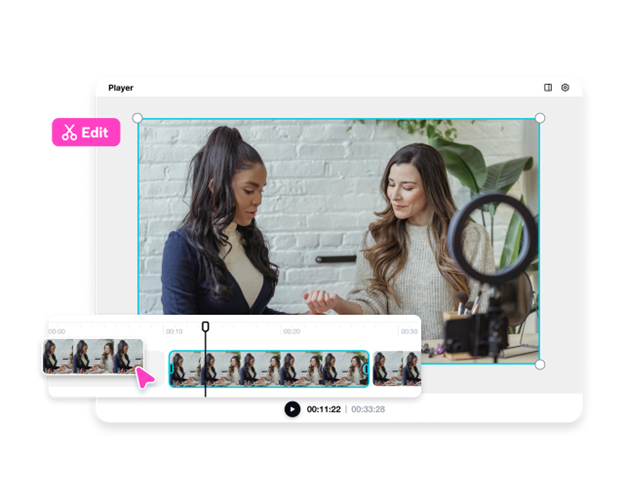
In the case of longer training series, content is controlled using features such as video trimmer. You are able to slice and serve the parts in brief, narrow modules. This makes employees stay active but not overworked.
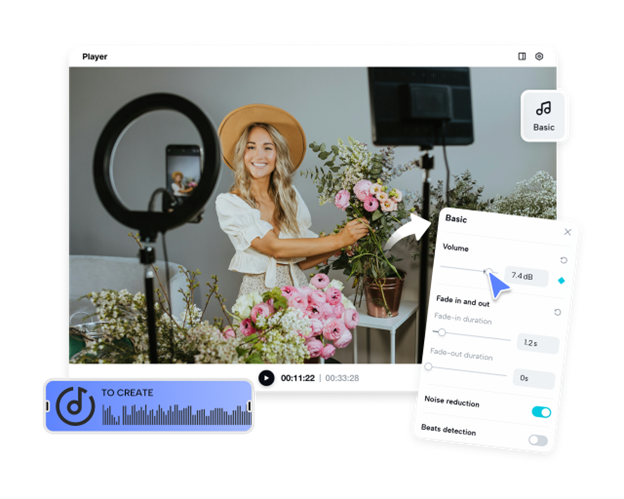
It also has a significant part in audio. Noise distortion can lessen understanding. Pippit also comes with options such as an audio trimmer to improve the quality of sound. Good sound and graphic images improve the learning process. All these combined make corporate training effective and professional.
Steps to Deliver Clean Corporate Training with Video Background Remover
Step 1: Set up your project input
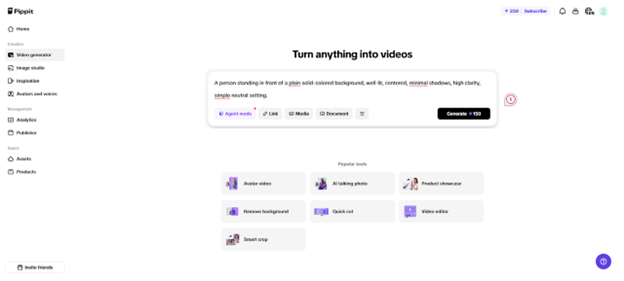
Open Pippit and sign up. Then move to the "Video generator" tab and add your text prompt. To enhance training videos, upload reference media through the "Add media" tab. Choose files from your device, phone, Dropbox, or paste a link. Assets are also available if you don't have media. Finally, click "Generate".
Step 2: Let AI streamline your training video
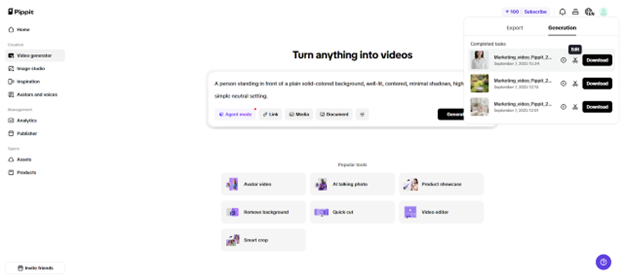
The AI creates your video based on the text prompt and reference media immediately. It regulates pacing, transitions and quality edits. It also automatically includes avatars, voice, lyrics, captions and photos/videos- perfect with structured learning material. To make finer adjustments, enter edit to enter the Pippit video editor.
Step 3: Remove background for professional clarity
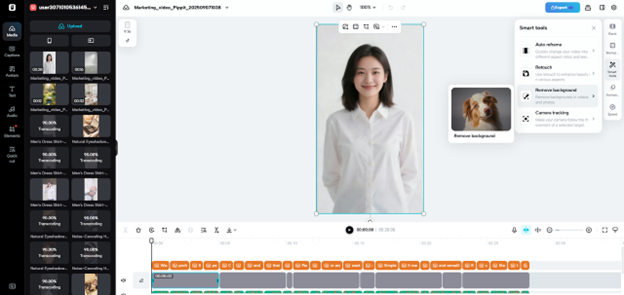
Now select your video and go into "Smart tools". Pick "Remove background" with either auto removal or chroma key. This ensures a distraction-free background suitable for training.
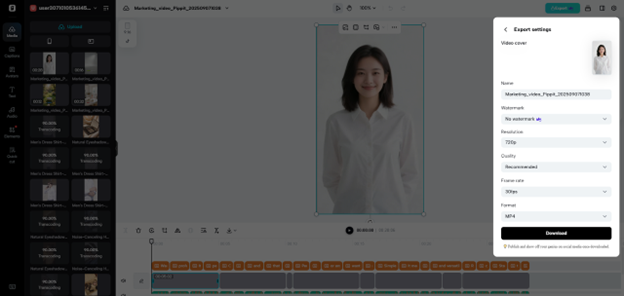
You can adjust captions, text formatting, and layout to keep messages clear. Add background music, effects, or filters if needed. When ready, click "Export" on the top right. Share lessons directly through "Publish" or save them with the "Download" option by setting your preferred format, resolution, frame rate, and quality.
Building Professional Training Modules with Pippit
Background editing is not all that professional training entails. You are able to add branded images such as business logos to every module with Pippit. Coded captions assist in informing the learners on the flow of instruction. Visual aids, charts and animated diagrams reinforce comprehension. These factors render your training more engaging and efficient.
Trust is also established by consistency across modules. Learners remain focused when every training session appears and feels the same. You can standardize the colors, logos, and background images on the platform. This gives employees a smooth learning process.
Tips for Engaging and Effective Corporate Videos
In the creation of training videos, tone is as important as visuals. Be professional but easy to talk to. There should not be distracting humor or irrelevant references. Consistency in the background throughout training. This reinforces corporate identity and serves to keep employees engaged.
Always ship your videos in 4k or HD. Boardrooms and online learning platforms require high-quality images. Clear production is an investment that makes a permanent effect on your audience.
Powerful imagery and organized rhythm should be used together, too. Do not have long, continuous material that lowers attention. Rather, divide training into smaller, digestible bites. This is in line with the way the employees internalize information.
Conclusion
Corporate training requires the balance between clarity, engagement and professionalism. Clear images and no distractions on the background enhance training. Pippit video background remover allows you to attain this standard with ease. Other features such as video trimmer and audio trimmer improve the quality of the image and audio.
Pippit gives you all you need to produce professional, branded training material. The site trains users with AI avatars and clean editing tools, which scale training. With these features, you are sure that all modules appear professional and clean. Corporate learners remain attentive, interested, and driven to take in information.
When you desire effective corporate learning outcomes, concentrate on clarity. Allow Pippit to supply the instruments to conduct training in a professional and effective way.