
Introduction
QR codes are among the fastest-spreading technologies of the digital age. Originally designed for industrial use, they quickly transformed into a universal bridge between the physical and digital worlds. Today, QR codes are on packaging, menus, tickets, posters, and even medical records—making information instantly accessible with just one scan.
To harness this innovation effectively, you need a reliable tool. GetQR is one such service: simple, powerful, and flexible. It empowers businesses, marketers, educators, and individuals to create dynamic, branded QR codes that stand out and deliver measurable results.
Why GetQR Stands Out
Dynamic Editing
With GetQR, you don’t need to reprint your codes. The destination link can be updated anytime—ideal for campaigns, promotions, or projects where content changes frequently.
Full Customization
Unlike many basic QR generators, GetQR allows you to customize design elements—colors, frames, logos, and calls to action—ensuring that your QR code matches your brand identity.
Real-Time Analytics
The platform doesn’t just generate QR codes; it also tracks them. You can see how many times your code was scanned, when, and on what type of device. These insights help optimize campaigns and better understand your audience.
Multiple Output Formats
Codes can be downloaded in high-resolution PNG, JPG, or SVG—making them suitable for both digital and print materials, from websites to large banners.
Free Trial and Flexible Plans
GetQR offers a free trial with essential features, so you can test the platform before upgrading to professional plans with unlimited scans and analytics.
Comparing GetQR with Other Services
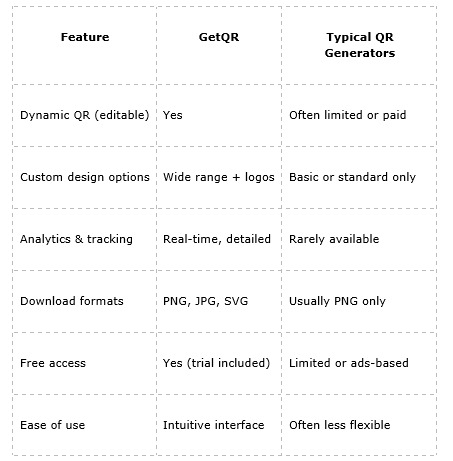
As the table shows, GetQR combines ease of use with professional-level features, making it more versatile than many competitors.
Practical Use Cases
Marketing & Advertising
- Add QR codes to posters, flyers, and product packaging.
- Update offers dynamically without reprinting materials.
Retail & E-commerce
- Connect customers to digital catalogs or online stores.
- Share video instructions or manuals directly from packaging.
Education
- Teachers can attach QR codes to homework, digital lessons, or resource lists.
- Universities can link to schedules or campus maps.
Events & Hospitality
- Provide guests with QR check-ins, event programs, or menus.
- Hotels and restaurants can share booking links or Wi-Fi details.
Healthcare & Real Estate
- Clinics can share appointment links or patient information securely.
- Real estate agents can provide virtual tours and property details via QR.
Key Advantages of GetQR
- Saves time and money - edit codes without redesign or reprint.
- Keeps branding consistent - logos and custom styles included.
- Provides valuable insights - track scans and audience behavior.
- Works everywhere - from small labels to large-format posters.
- User-friendly - create and download QR codes in minutes.
How to Get Started with GetQR
- Visit http://getqr.com/ and choose the type of QR code (URL, file, PDF, etc.).
- Customize its design with colors, frames, and your logo.
- Generate and download your QR code in the required format.
- Place it on your materials and track performance in real time.
Final Thoughts
QR codes are no longer just a technical tool—they’re an essential part of everyday communication. GetQR makes this technology simple, effective, and professional. With dynamic editing, custom branding, and real-time analytics, the platform is a clear choice for businesses and individuals who want more than just a black-and-white code.
If you are looking for a reliable, innovative, and easy-to-use QR code generator, GetQR is a solution that delivers both creativity and measurable impact.