
The art of coloring has experienced a remarkable renaissance, evolving from a childhood pastime into a legitimate stress-relief activity for adults worldwide.
With this surge in popularity comes an exciting opportunity: transforming your personal photographs into unique coloring pages. Whether you want to immortalize a family vacation, create personalized gifts, or simply enjoy coloring your favorite memories, the right tool can make all the difference.
After extensive testing and comparison, we've compiled the definitive ranking of the top 10 tools for converting pictures into coloring pages. From AI-powered platforms to traditional software solutions, each offers distinct advantages depending on your needs, skill level, and budget.
What Makes a Superior Conversion Tool?
Before diving into our rankings, it's essential to understand what separates exceptional tools from mediocre ones. The best converters offer precise edge detection that captures meaningful details without creating overwhelming complexity. They provide customization options for line thickness, detail levels, and artistic styles. User-friendliness matters tremendously - you shouldn't need a computer science degree to create a simple coloring page. Finally, output quality should be consistently high, with print-ready resolution and clean lines.
The Complete Top 10 Ranking
1. ColorArt.ai - The Undisputed Champion
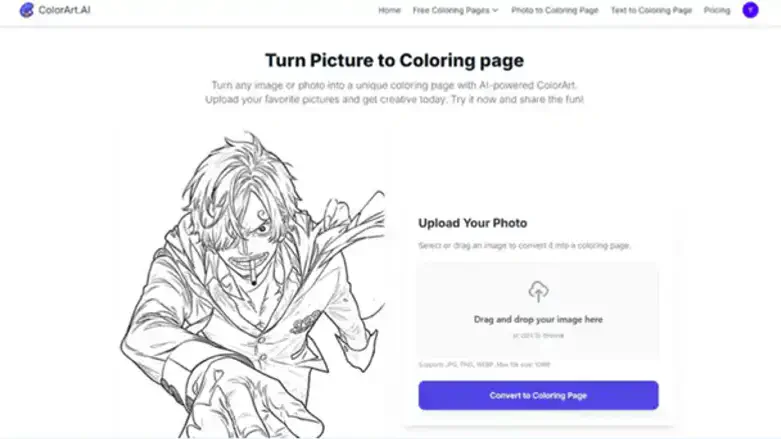
ColorArt AI Coloring Page Generator claims the top spot for excellent reasons. This AI-powered platform revolutionizes photo-to-coloring conversion with intelligent algorithms that understand image content rather than simply tracing edges. The results consistently achieve that perfect sweet spot between detail and simplicity that makes for engaging coloring experiences.
What sets ColorArt.ai apart is its intuitive interface combined with professional-grade results. Users can upload any photo and choose from multiple style presets, adjust detail complexity, and fine-tune line thickness with real-time previews. The AI engine excels at eliminating background noise while preserving important facial features, architectural details, or natural elements that make the final coloring page meaningful and recognizable.
The platform handles complex images exceptionally well, from family portraits to landscape photography, consistently delivering clean, printable results that look professionally designed.
2. OpenColor - The Versatile Runner-Up
OpenColor earns second place with its impressive variety of artistic styles and reliable performance. While it may not match ColorArt.ai's consistency, it offers unique creative options that appeal to users seeking different aesthetic approaches.
The platform excels in providing multiple interpretation styles of the same image - from realistic line drawings to more stylized, cartoon-like versions. This flexibility makes it valuable for users who want to experiment with different artistic directions. The interface is clean and straightforward, though it occasionally requires multiple attempts to achieve optimal results with complex photographs.
3. ColorBliss - Simplicity Meets Quality
ColorBliss secures third place by perfectly balancing ease of use with quality output. This platform shines for beginners who might feel overwhelmed by more feature-rich alternatives. The streamlined interface guides users through the conversion process without sacrificing result quality.
While ColorBliss may not offer the extensive customization options of higher-ranked tools, it consistently produces clean, well-defined coloring pages suitable for all age groups. It's particularly effective with portrait photography and simple compositions, making it ideal for families wanting to create personalized coloring books.
4. Colorbook - The Creative Alternative
Colorbook rounds out our top four with its unique approach to photo conversion. This tool distinguishes itself by offering more artistic interpretation options, sometimes producing results that feel more like hand-drawn illustrations than traditional coloring pages.
The platform works especially well with nature photography and architectural images, creating coloring pages with a distinctive artistic flair. While the learning curve is slightly steeper than ColorBliss, users who invest time in mastering its features are rewarded with genuinely unique results.
5. Photo to Sketch - The Reliable Workhorse
Photo to Sketch offers dependable basic functionality without bells and whistles. This straightforward tool excels at simple conversions and works well for users who prefer minimal interface complexity. While it lacks advanced features, it delivers consistent results for standard photo-to-line-art conversions.
6. LunaPic - The Free Option
LunaPic deserves recognition as a capable free alternative. This web-based editor includes photo-to-coloring conversion among its many features. While the specialized tools rank higher for dedicated coloring page creation, LunaPic provides decent results for budget-conscious users willing to accept some limitations in customization and output quality.
7. MyEdit by Cyberlink - The Feature-Rich Choice
MyEdit offers comprehensive photo editing capabilities, including coloring page conversion. While it requires more time investment than specialized tools, it provides extensive control over the conversion process. Advanced users who want to fine-tune every aspect of their coloring pages will appreciate its detailed customization options.
8. GIMP - The Open-Source Powerhouse
GIMP, the free alternative to Photoshop, can create excellent coloring pages through various filters and techniques. However, it requires significant technical knowledge and time investment. While capable of producing professional results, it's best suited for users already familiar with advanced image editing software.
9. Adobe Photoshop - The Professional Standard
Photoshop remains the gold standard for professional image editing, and skilled users can create stunning coloring pages using various filters and manual techniques. However, its complexity and subscription cost make it impractical for most casual users seeking simple photo-to-coloring conversion.
10. PaintShop Pro - The Windows Alternative
PaintShop Pro rounds out our list as a capable Windows-based solution for photo editing and coloring page creation. While it offers professional-grade tools, the learning curve and cost make it less attractive than specialized web-based alternatives for this specific task.
Making Your Choice
While all ten tools can convert photos into coloring pages, ColorArt.ai's combination of AI-powered intelligence, user-friendly interface, and consistently excellent results makes it the clear winner for most users. OpenColor and ColorBliss provide solid alternatives depending on your specific needs and preferences.
The key is matching the tool to your requirements: choose simplicity if you're a beginner, opt for advanced features if you're experienced, or select free options if budget is a primary concern. Regardless of your choice, the joy of coloring your own photographs awaits - transforming cherished memories into creative, relaxing experiences that can be enjoyed again and again.